TROUBLESHOOTING
It will come as no surprise that a vast amount of computational power is required to generate a 3D View of a layout and this problem is compounded should the host machine be somewhat aged. It’s fairly obvious that typically the more complex the boards the longer the render time but there are particular entities and computer limitations that can also have a negative effect.
The speed at which the 3D scene is rendered depends on a number of factors, these can include, though are not limited to: the number and complexity of components; the complexity of the boards tracking, pads, holes and silk screen; the available memory on the machine and number of cores; the video card used; limitations in the video drivers; size and number of STEP models.
The number and complexity of components affects the total number of polygons in the scene, the more there are, the longer it takes to work out where they are in 3D, if they are visible and then if necessary to drawn them.
The complexity of the boards tracking pads and holes not only has a significant influence on the number of polygons that have to be displayed in the final scene, but also can place a significant burden on the pre-processing algorithms required to reduce the final polygon count and improve the image quality. Objects of particular note that may cause slow rendering are hatched zones and curved tracking.
The processing and storage of a 3D scene can consume significant quantities of memory, in some cases this consumption can be sufficiently high that data will need to be swapped to disk, which will slow down the processing significantly.
Video cards are available in a wide range of prices, with a general correlation between the price of the card and the speed at which it can handle 3D scenes, with higher priced cards also having additional features. Cards may also have hardware limitations, such as not being able to render on a secondary monitor or only being able to do so slowly.
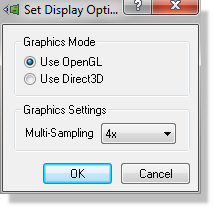
Some video device drivers do not fully exploit the capabilities of a 3D video card, this is particularly true of many of the drivers supplied with the operating system. The first thing to do if you are experiencing a render failure is to try switching to an alternative 3D rendering technology. You can switch between OpenGL and DirectX (Direct3D) from the Set Display Options on the System Menu.
If you are experiencing delays or jumping, then it may help by turning the Multi-Sampling off. This can improve speed and stability of the 3D Viewer, especially if you are using INTEL Graphics cards.