PARAMETERIZED CIRCUITS
Introduction
Proteus has a unique and tremendously powerful feature which combines sheet properties, object properties and hierarchical design to facilitate parameterized circuits. A parameterized circuit is one in which some of the component values (or other properties) are given as formulae rather than as constant values. Naturally, the formulae contain variables or parameters and the values for these are taken from the sheet properties defined for that particular instance of the circuit. It then follows that, in the context of a hierarchical design, different instances of the circuit can have different parameters and therefore different component values.
For more information about hierarchical design see Hierarchical Designs. If you have no idea what a hierarchical design is, we suggest you skip this section entirely for the time being!
Example
Parameterized circuits are best illustrated by an example design which you can load from the samples browser (Open Sample on the Proteus home page) under Graph Based Simulation, Low Pass Filter.
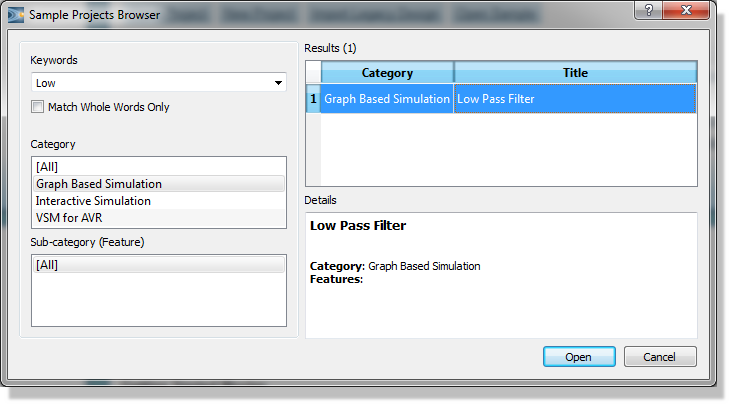
Opening the Low Pass Filter sample from the Sample Projects Browser
The root sheet of this design is shown below:
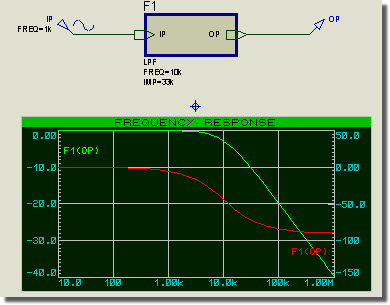
The root sheet of the LPF sample, with the frequency response graph
It consists of a single sub-circuit which has two user properties defining the desired frequency and impedance for the filter. The module attached to the sub-circuit is the actual parameterized circuit. Use the Design Explorer to navigate to this sheet, or point at the sub-circuit and use Goto Child Sheet (CTRL+C).
More information on the Design Explorer can be found here.
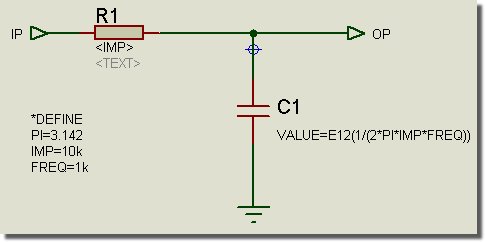
The Sub-circuit sheet of the LPF sample
There are several points to note about it:
- The DEFINE block defines three sheet properties: PI, IMP and FREQ. PI serves as a constant in the property expression for the capacitor value. IMP and FREQ are only defaults: the parent sub-circuit assigns both of them too, and a value coming down from the parent always wins, so the circuit works on its own and still responds to whatever the parent asks for.
- The resistor's value field contains the string <IMP>. This syntax with the chevrons (<>) causes the netlist compiler to substitute the <IMP> with the value of the IMP sheet property, that is 33k. In this case, no expression evaluation is performed, the substitution is purely literal.
- The capacitor has a user property assignment (in its property block) which specifies its value as an expression. The E12 function specifies both that the expression should be evaluated by the netlist compiler, and also that it should be rounded to the nearest E12 value. The other options are EVAL (no rounding) and E24 (round to E24 value).
PI, IMP and FREQ are all sheet properties. PI comes from the DEFINE block whilst the values actually used for IMP and FREQ come from the parent sub-circuit.
If we generate an HTML Bill of Materials, you will see the following:
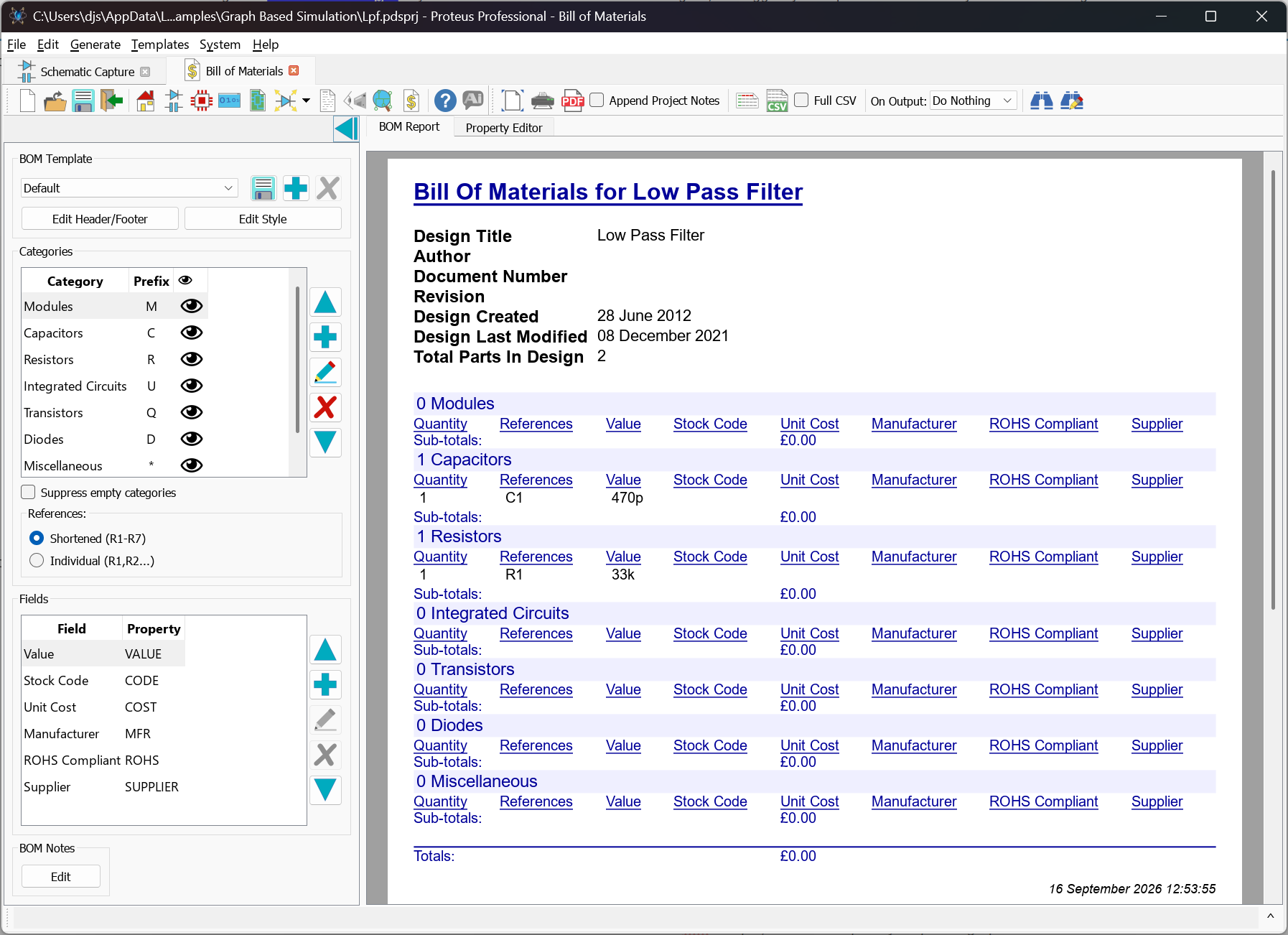
The HTML Bill of Materials for the LPF Sample Design
Proteus has evaluated 1/(2*3.142*33000*10000) to get approximately 0.000000000482 and then rounded this to the nearest E12 value, 470p.
For more about the Bill of Materials see Bill of Materials.
There are in fact two distinct processes going on in the above example: property substitution and property expression evaluation. Both have their advantages and disadvantages and the following sections discuss each in more detail.
Property Substitution
This is the mechanism that is used for the resistor value and will operate whenever the netlist compiler encounters a property value containing a property keyword enclosed in chevrons (<>). If the keyword matches a sheet property, then the expression in chevrons is replaced with the value of the sheet property. If no sheet property exists, then a netlist warning is generated and the property is left unsubstituted, so the chevron text appears verbatim in the netlist or the Bill of Materials. A mis-spelled parameter therefore shows up as literal text in your output rather than as a missing value.
Substitution is repeated rather than performed once. If the text that has just been substituted in itself contains a keyword in chevrons, that keyword is substituted in turn, and so on. This lets you use a DEFINE block as a macro: a sheet property can hold a whole expression built from other parameters, and referring to it once pulls the entire expression in. A chain of more than about ten substitutions is assumed to be circular and is abandoned with the warning "Excessive nesting of parameter definitions".
There are two main cases where property substitution is useful:
- You can use it in a parameterized circuit in which the parameters are not numeric. Packages for PCB design are perhaps the most common example of this. It is all very well getting Proteus to compute that a 470pF capacitor is to be used, but you may still need to package it for PCB design. If you attach to the capacitor the user property:
PACKAGE=<C1_PACKAGE>
then you can add the property:
C1_PACKAGE=CAP10
to the sub-circuit. When netlisted, the C1 will appear with the property
PACKAGE=CAP10
Property expression evaluation cannot be used for this, because CAP10 will not evaluate as a number. - The other major use for property substitution is for setting up sweep analyses with Proteus VSM. In this case, you want the simulator to evaluate the expressions, not the schematic module, and it may then be appropriate to build up component properties using property substitution rather than property expression evaluation. Further discussion of this is given in the VSM manual.
Property Expression Evaluation
In contrast to property substitution which is a purely textual process, property expression evaluation involves Proteus in numerically evaluating a property value that is in the form of a formula, and replacing it with its value. In addition, Proteus can also round the resulting number to an E12 or E24 series value.
There are three forms of syntax:
EVAL (...)
E12 (...)
E24 (...)
The keyword must be the first thing in the property value; an expression buried in the middle of a longer string is not evaluated.
Operators and Values
Within the parentheses you can use the following operators, listed from lowest precedence to highest:
| Operator | Description |
|
+ - |
Addition and subtraction. |
|
* / % |
Multiplication, division and integer remainder. Both operands of the remainder operator are truncated to whole numbers before the operation. |
|
^ |
Raise to a power, so that 2^10 is 1024. |
|
- |
Unary minus, used to negate the term that follows it. |
Further levels of parentheses may be used to override the precedence as required, to a maximum nesting depth of ten.
Values can be constant numbers, or the names of sheet properties. A number may carry the usual engineering suffixes, so 20k is read as 20000. Only sheet properties whose values are numbers become available to the expression; a sheet property holding text is simply not there as far as the evaluator is concerned.
Some example expressions are shown below:
| Expression | Description |
|
EVAL(1/(A+B)) |
A and B are sheet properties. |
|
E12(20k+2*F*PI) |
20k automatically treated as 20000. |
|
E24(3+4*5) |
Evaluates to 24. |
|
EVAL(sqrt(L/C)) |
The characteristic impedance of an LC network, using two sheet properties and a function. |
Mathematical Functions
A range of mathematical functions is available inside an expression. Function names are not case sensitive, and the argument of a function may itself be a complete expression.
| Function | Description |
|
sqrt(x) |
Square root. |
|
exp(x) |
Exponential, e raised to the power x. |
|
ln(x) |
Natural logarithm. As in SPICE, the magnitude of x is used, so a negative argument does not produce an error. |
|
log(x) |
Logarithm to base 10, again taken on the magnitude of x. |
|
sin(x), cos(x), tan(x) |
Trigonometric functions. The angle is in radians. |
|
asin(x), acos(x), atan(x) |
Inverse trigonometric functions, returning an angle in radians. |
|
sinh(x), cosh(x) |
Hyperbolic sine and cosine. |
|
asinh(x), acosh(x), atanh(x) |
Inverse hyperbolic functions. |
|
floor(x), ceil(x) |
Round down and round up to a whole number. |
|
integer(x), frac(x) |
The whole part and the fractional part of x, each keeping the sign of x. |
|
sgn(x) |
The sign of x, giving minus one, zero or plus one. |
|
mod(x,y) |
Remainder after dividing x by y, both truncated to whole numbers first. |
|
pwr(x,y) |
The magnitude of x raised to the power y. The result is never negative. |
|
pwrs(x,y) |
As pwr, but the result takes the sign of x. |
|
stp(x) |
Unit step, giving zero for a negative x, one for a positive x and a half at zero. |
|
limit(lower,x,upper) |
Constrains x to lie between the two bounds, returning the nearer bound if it falls outside them. |
|
e12(x), e24(x) |
Round to the nearest E12 or E24 preferred value. |
The e12() and e24() functions are more flexible than the E12 and E24 wrappers described below, because they round an intermediate result rather than the final answer. Writing EVAL(1/(2*PI*e12(R)*C)) computes the answer from the resistor you will actually fit, rather than from the ideal one.
Although in some ways more powerful than property substitution, there are some limitations:
- The evaluator can only handle numeric values. Expressions involving strings are not allowed.
- You can only reference sheet properties in the formula. You cannot access other object properties or the values of other components.
Root Sheet Objects and Netlist Scope
Substitution and evaluation are carried out as the netlist is compiled, and how much of the design that compilation covers decides whether objects on a root sheet are processed at all.
Objects placed directly on a root sheet have their properties substituted and evaluated only when the run covers the whole design. On a partial run they are left exactly as typed, so a value of EVAL(500/PI) reaches the output as the literal text EVAL(500/PI), and no warning is given. Objects inside a sub-circuit or module are always processed, whatever the scope of the run.
Runs that cover the whole design, and therefore always evaluate everything, include simulation of any kind, the Design Explorer and the Netlist Compiler with the Scope set to Whole Design. Runs that do not include the Bill of Materials, the netlist passed to the layout module, Electrical Rules Checking, and the Netlist Compiler with the Scope set to Current Module or Current Board.
This is rarely a problem in practice, because a parameterized circuit needs a parent to supply its parameters and therefore belongs on a child sheet. If you do want a computed value on a root sheet component and it is reaching the Bill of Materials unevaluated, enter the value literally instead.
For the Scope options see Netlist Generation.
The Rounding Functions E12(), E24()
The property expression evaluation mechanism supports the ability to round the resulting value to the nearest E12 or E24 value. This prevents parameterized circuits ending up with non-available or multi-digit floating point values.
You should note:
- Rounding will be disabled for expressions that yield zero or negative values. This is unlikely to be a problem as negative valued resistors and capacitors are hard to come by anyway.
- The rounding is done on a geometric rather than an arithmetical basis, so the boundary between two adjacent values in the series is their geometric mean rather than their average. In the E12 series the boundary between 3k3 and 3k9 falls at the square root of 3.3 times 3.9, which is 3.59k, rather than at 3.6k. This, we feel, is in keeping with the thinking behind the E12 and E24 series themselves.
- Bear in mind that if a parameterized circuit contains several rounded values, there is no mechanism to round them all in the optimum directions, taking into account the way they may interact. This means that for critical filter designs and such like, you may be better computing the values manually (considering the various possible mixes of values) and using parameter substitution to load your chosen values directly into the circuit.
Of course, if you have Proteus VSM, you can run a simulation and see how the values Proteus has chosen affect the circuit performance.