INTRODUCTION
Introduction
Visual Designer is a unique development tool that uses flowchart blocks together with schematic clips of Arduino™ shields, Raspberry Pi hats, and microcontroller modules to enable drag-and-drop creation of real-world embedded systems. Visual Designer now supports projects based on Arduino, Raspberry Pi, and a growing range of microPython compatible boards such as Pi Pico W, ESP32-S3, and others.
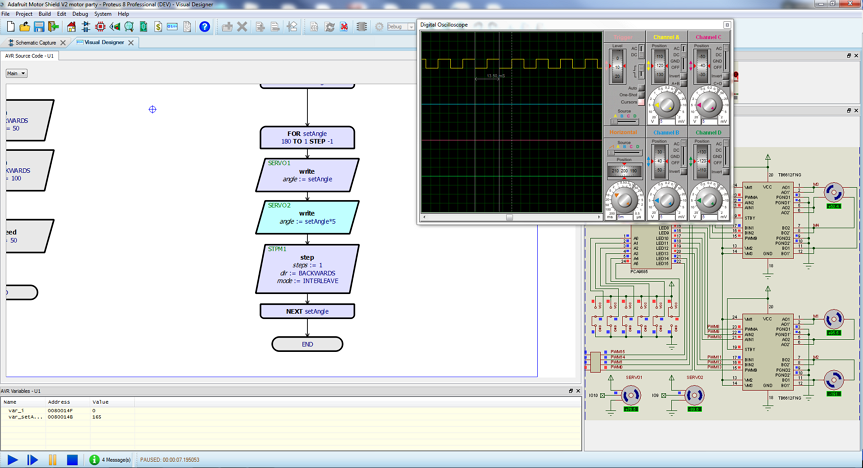
Single step debugging in Visual Designer with the AdaFruit Motor Shield
This document explains the various features of Visual Designer and includes several practical example projects and walkthroughs. Other modules in the Proteus system such as the schematic capture and general simulation have their own help files and are companion resources to this document. You'll find these help files either on the help menu in the schematic capture module or via the Help section on the Proteus home page.
Launchpad for other help files.
What is Arduino™ / Genuino™?
Arduino is an open-source computer hardware and software company, project and user community that designs and manufactures microcontroller-based kits for building digital devices and interactive objects that can sense and control objects in the physical world.
The project is based on microcontroller board designs, manufactured by several vendors, using various microcontrollers. These systems provide sets of digital and analog I/O pins that can be interfaced to various expansion boards ("shields") and other circuits.
See Also:
The Arduino and Genuino names and logos are registered trademarks of Arduino, LLC. The Visual Designer for Arduino simulation product is not directly connected or endorsed by Arduino.
What is MicroPython ?
microPython is a lean implementation of the Python 3 language designed to run on microcontrollers. It allows you to control hardware directly using Python scripts — ideal for education, rapid prototyping, and wireless IoT applications.
Visual Designer supports flowchart-based development for several popular microPython boards, including:
-
Raspberry Pi Pico and Pico W
-
ESP32-S3 variants
-
PYBOARD microcontrollers
This means you can now use the same flowchart methodology to program microPython firmware, simulate it within Proteus, and deploy it to physical microPython-compatible boards.
What is Raspberry Pi ?
Raspberry Pi is a series of small, low cost, single board computers. The Raspberry Pi is still a complete Linux computer but is still often used to control external electronics.
What is Grove ?
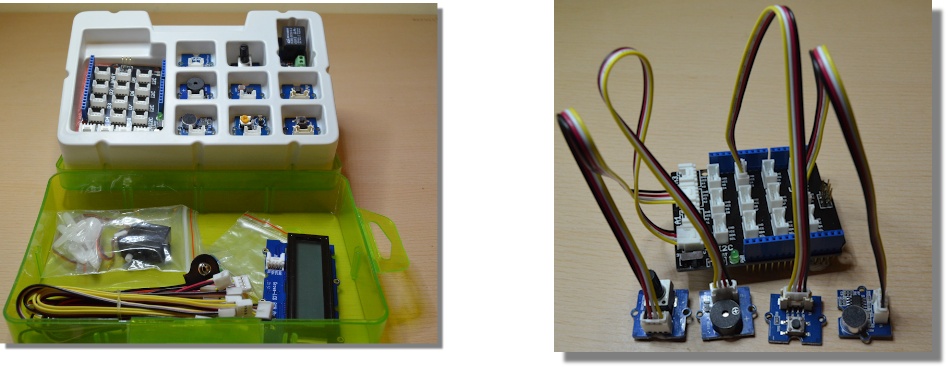
Grove is a modular electronic platform for quick prototyping. Every module has one function, such as touch sensing, creating audio effect and so on. Just plug the modules you need to the base shield, then you are ready to test your ideas.
This Grove Starter Kit is a great way for beginners and students to get started with Arduino. The Grove Base Shield drops onto your existing Arduino and lets you connect up to 16 Grove modules without any fuss. The Arduino headers are still broken out on the top of the shield making it very easy to connect other breakout boards and sensors to your Arduino.
See Also:
Raspberry Pi: Limitations of Simulation
The Raspberry Pi is a high level behavioural model in terms of simulation. Since the rPi runs a full copy of Linux and arbitrary code can be executed a full simulation model is not possible. Specifically, the following libraries are supported:
smbus
pygame
wiringpi
RPi.GPIO
spidev
There is also a set of Python libraries, which are supplied by us in the Raspberry Pi drivers directory:
Adafruit_GPIO
Adafruit_I2C
Adafruit_MCP230xx
Adafruit_MCP3008
Adafruit_MotorHAT
Adafruit_PCA9685
Adafruit_PureIO
automationhat
explorerhat
ADS1x15
cap1xxx
grove_128_64_oled
grove_rgb_lcd
grovepi
max31855
pcf8574
pcf8591
piglow
sn3218
If you are writing your firmware with Visual Designer flowchart blocks then the Raspberry Pi simulation should work with no problems. However, if you convert your project to write your program in Python then of course you can write code that is based on other Python libraries. In such cases you may not be able to simulate your project because your source code may pull in libraries unsupported in simulation.
“Note: microPython-based targets such as the Pi Pico W do not run a full Linux OS and are fully supported in simulation.