INITIAL CONDITIONS
Overview
Whenever any type of simulation is performed, the first thing that PROSPICE does is to compute the operating point of the circuit, that is the steady state conditions that apply prior to any input signals being applied. There are two distinct modes of operation associated with computing these values:
- The operating point is found with all capacitors charged and inductors fluxed. In this case, a Transient Analysis will show the behaviour of the circuit as though power were applied sufficiently prior to time zero that by the start of the simulation everything had settled down. This is the default mode of operation, and given the ability to specify initial conditions for particular components and/or node voltages, serves for most purposes.
- The operating point is found with all capacitors short circuited and inductors open circuit. In this case, a Transient Analysis will show the behaviour of the circuit as though power were applied at time 0. This mode of operation is selected by unchecking the Initial DC solution: option on the graph.
In either case, it is possible to specify the initial conditions for particular components or node voltages. This is especially useful for circuits which are oscillators, or for which circuit operation depends on a particular capacitor being discharged at time zero. Indeed, the concept of a steady state operating point is meaningless for an oscillator, and the simulation may fail completely if some initial conditions are not given.
Specifying Initial Conditions for a Net
The easiest way to specify initial conditions is often to indicate the starting voltage for a particular net.
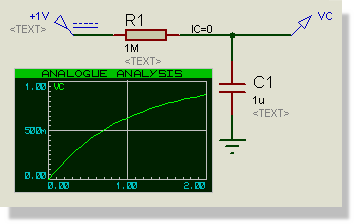
Setting the start voltage with an IC wire label
In the above circuit, this is achieved by adding a wire label with the text IC=0 to the probed net. Without this assignment, PROSPICE would compute the steady state value of the voltage on C1, that is 1 Volt, and the graph would show VC as a horizontal straight line.
For nets which interconnect only digital components, you should use a logic state rather than a voltage, and assign it to the BS (Boot State) property. The accepted keywords are:
0 1 HIGH H SHI IHI WHI LOW L SLO ILO WLO FLOAT FLT F
The parse is not case sensitive. FLOAT, FLT and F are three spellings of the same state, and IHI and ILO are the inject strength that generators drive with. Anything else, including a valid keyword with text after it, produces:
Bad state value [X] for property [BS].
For mixed nets, you should specify an initial voltage. This will be automatically propagated as a logic level to the digital components.
See Also:
The Digital Simulation Paradigm
Specifying Initial Conditions for Components
This option is only available when PROSPICE does not compute the initial operating point, that is when the Initial DC solution: option on the graph is not checked. In this case, all node voltages will be zero at time zero, except for nets with initial condition properties as described above. Under these conditions, it is then possible to specify initial conditions for particular components. For example, you could add the property
IC=1
to C1 in the previous example such that C1 started from its steady state value of 1 Volt.
The two cases that matter are the capacitor, where IC is the initial voltage across the device, and the inductor, where it is the initial current through it. Other SPICE primitives take the parameters defined for them by the Berkeley SPICE3F5 set.
Note the difference between a net and a component. IC can be given either as a wire label on a net or as a property on a component; NS is a net property only.
In some ways it is a shame that this option is not available when the operating point is computed, but this is how SPICE3F5 has been coded by Berkeley. However, we have added the PRECHARGE property as a remedy to this problem.
NS (NODESET) Properties
Occasionally, when a simulation fails to find the operating point, it can be useful to give SPICE a hint as to the initial values to use for particular nets. This is different from setting the initial conditions in that the value given is only used for the first iteration, and the net then floats to whatever value the matrix solution converges at. It is, then, an aid to convergence and should not affect the actual operating point solution.
Such convergence hints can be specified using the NS net property, so placing a wire label with the text NS=10 will suggest a starting value of 10 Volts for that net.
The underlying mechanism is the standard SPICE3F5 .NODESET card, so any general SPICE reference will describe its behaviour in more detail.
PRECHARGE Properties
A further option for specifying the initial conditions is the PRECHARGE property. This may be assigned to any capacitor in the circuit and specifies the voltage across the device.
The inductor equivalent is a separate property, PREFLUX, which specifies the current through the device.
A PRECHARGE property placed on an inductor is silently ignored. Use PREFLUX there.
The PRECHARGE property is a Labcenter specific addition to SPICE, and differs from the IC property in that it is applied irrespective of whether the Initial DC solution: option is selected or otherwise.
The same name is also read as a design property, where it acts as a switch rather than a value. Giving the design PRECHARGE=OFF or PRECHARGE=FALSE has the same effect as unchecking Initial DC solution:, which is useful if you want the setting to travel with the design rather than with one graph.