CONNECTIVITY RULES
Overview
The required connectivity of the board is determined by the connections made in the schematic and transmitted via the netlist to the PCB layout. The connectivity widget at the bottom of the layout module provides live status on the board connectivity. This indicator displays the state of the netlist (locked, changes pending, netlist errors, etc.) if it is not synched or the number of missing connections if the netlist is synched. This makes sense as without a synched netlist the status of the connections is unknown!
See Also:

The connectivity status widget on the layout status bar
Assuming the netlist is in synch and you do have missings you can click on the connectivity status widget to launch the Connectivity Errors - CRC window, which lists the problem connections under the columns Error Type, 1st Pin, 2nd Pin and Net. Double clicking on an item in the list will then both tag and navigate to the problem area.
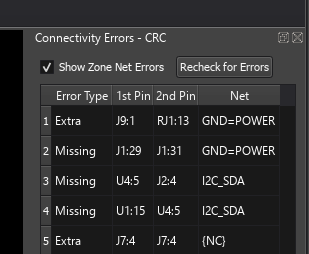
The Connectivity Errors - CRC window listing the problem connections
Basic CRC Functions
The CRC check shows:
- Each pair of pins joined by a ratsnest line is listed. These are error type Missing, since they represent a connection that should be made.
- Any extra (non specified) connections to each net are highlighted. These are error type Extra, since they represent a connection not specified on the schematic.
- There are only these two error types. A missing connection on a net that carries a zone is listed as Zone rather than Missing, because with auto zone regeneration off or quick draw zones on (System > Set Zone Operation, the Zone Configuration dialogue) the zones are not re-flooded and it is not yet known whether the flood would make the connection. Zone is a label applied to a missing connection, not a third kind of error.
Clearing the Show Zone Net Errors checkbox at the top of the window suppresses every CRC error on a net that carries a zone, extras as well as missings, and re-runs the check. The checkbox is ticked by default. In a large or complex design this lets you turn off zone regeneration for performance, work through the remaining connectivity issues in the CRC window, then turn zone regeneration back on and press Recheck for Errors to confirm that the zone flood really does make the outstanding connections.
If you click on the entries in the listing, Proteus will tag the associated location on the board and zoom the editing window in a similar fashion to the Connectivity Highlight function.
In a normal working environment zones (power planes) re-generate automatically and therefore the connectivity is always known. However, in extremely complex boards the auto regen can be turned off (System > Set Zone Operation) leaving an ambiguous connectivity situation. In this case the Show Zone Net Errors checkbox can be cleared to allow other CRC issues to be resolved before turning zone regen back on and performing final connectivity checks.
Advanced CRC Functions
The CRC check also:
- Completely re-initialises the netlist management part of the layout database. Any floating tracking, that is tracking not connected to anything, is detached from netlist management whilst any detached tracking that has become connected to a net is brought under netlist management.
- Traces and vias involved in any extra connections are assigned to the VOID net. The VOID net is cleared and rebuilt from scratch on every CRC run, so a piece of tracking that has since been reconnected correctly will come back out of it. Further information on VOID tracking is given in The Netlist Loader & Existing Tracking.
- Skips nets marked NC. Missing connections are never reported on a no-connect net, which is why a deliberately unconnected pin does not appear in the CRC list. Pins that are simply unconnected, rather than marked NC, are reported by the Single Pin Net Report instead.
See Also: