DC SWEEP ANALYSIS
Overview
With a DC Sweep analysis you can see how changing a circuit will affect its operation. This is achieved using Property Expression Evaluation in the PROSPICE simulator engine. The sweep graph defines a variable that can be swept in even steps over a user-defined range. The sweep variable can appear in any property within the circuit, such as a resistor value, a transistor gain or even the circuit temperature.
A DC Sweep curve shows the steady state voltage (or current) levels of the probed points around the circuit, as the swept variable is increased. It can be used to plot the DC transfer characteristic of a circuit by assigning the swept variable to a generator value, as well as plotting the effect of changing component values on the operating point of the circuit.
Method of computation
In a DC sweep PROSPICE will repeatedly find the operating point of the circuit, incrementing the swept variable between calculations. PROSPICE will re-calculate all the variables used between steps, so the swept variable can be used as often as is required, and variables based on the swept variable can also be used. Any circuit initialisation parameters will be honoured for every operating point calculated.
Using DC Sweep Graphs
In common with analogue transient analysis, either the left, right or both y-axes may be used. The graph x-axis shows the swept variable. Trace expressions, described in The Add Trace Command Dialogue Form, may be used in DC sweeps.
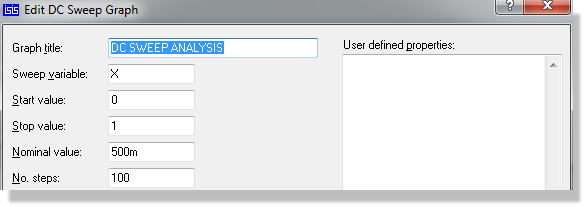
The sweep itself is defined on the Edit DC Sweep Graph dialogue form. Sweep variable names the variable, which defaults to X, and Start value and Stop value give the extremes of the sweep. No. steps sets how many increments are taken between them. When choosing the number of steps, bear in mind that simulation time is roughly proportional to the number of steps used.
Nominal value is the value the sweep variable takes when it is not being swept. Whenever a single operating point is computed instead of the sweep, such as when you use the Operating Point Info command on a paused simulation, the variable is given this value.
To plot the transfer function of a circuit:
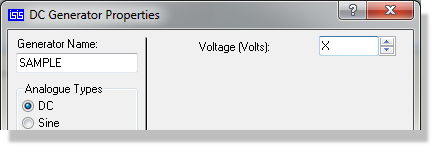
- Place a DC generator on the input of the circuit.
Set its value to be X.
- Place one or more probes at appropriate outputs of the circuit.
- Place a DC Sweep graph, and add the probes to it. See Adding Traces To A Graph.
- Edit the graph and set the start and
stop values to the extremes of the input sweep that you want. Check
that the swept variable is X.
- Press the space bar to invoke PROSPICE.
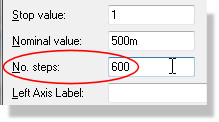
- If the resulting traces look disjointed or angular
when you zoom in on the graph, increase the number of steps in the
Edit DC Sweep Graph dialogue form.
To see the effect of altering circuit values:
- Set up the circuit as you would for a transient analysis. Add probes and generators at appropriate points in the circuit.
- Edit the components whose values you are interested in. Set their values to be expressions containing X, the swept variable. You can edit just one, or several components.
- Place a DC Sweep graph, and add the probes and generators to it. See Adding Traces To A Graph.
- Edit the graph, and set the sweep parameters up accordingly.
- Press the space bar to invoke PROSPICE.
Remember that all dialogue forms in Proteus have context sensitive help available via a point and shoot interface with the question mark at the top right of the dialogue form.
See Also: