TEMPLATES & TECHNOLOGY
Overview
Proteus layout includes a comprehensive scheme for design re-use in the form of board templates and technology data. Whenever a new project is started, the PCB is initialised from a template which provides a way to re-use configured information.
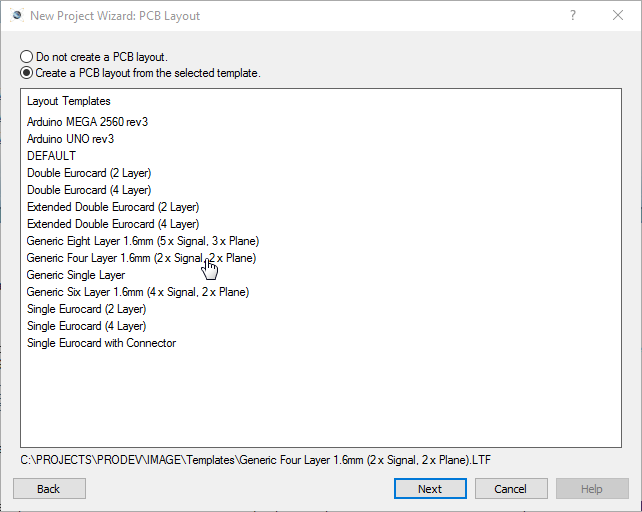
Choosing a board template when starting a new project
Users can create their own templates for common layout types and then select them for re-use in future projects.
The generic templates in particular are useful as they all have pre-configured layer stacks for standard 1.6mm PCBs. If you are working on an HDI board, start instead from one of the HDI templates, which arrive with a 1+n+1 stackup and its laser-drilled micro-via spans already defined.
Template Files
A template file will contain the following:
- Board Edge
- 2D Graphics (e.g. Company Logo)
- Loose Pads (e.g. Mounting Holes)
- Dimensions and zone boundaries
- Placed components, though not the netlist connections they carry
It is just as important to know what a template does not contain. Tracking, vias, teardrops, the ratsnest and the copper generated inside a zone are all discarded as the template is written. You cannot ship a routed board as a template, and equally you do not need to strip the routing out before saving one.
In addition, the current settings of the technology data is always stored when a file is saved as a template.
Technology Data
Technology data is a superset of the settings on the Technology menu. It covers eleven categories:
- Design Rules and Net Classes, including the silkscreen tolerances
- Differential Pair Classes
- Grid Settings
- The default units, imperial or metric, that a new session starts in
- Layer Stackup and Drill Spans
- Layer Pairs
- Pad, trace and 2D graphics styles
- Teardrop Configuration
- Length Matching Configuration, held as three separate parameter sets covering normal length matching, differential pair length matching and differential pair phase matching
- Test point rules
- Text Styles and Board Properties
Pad and trace styles are the ones that catch people out. They travel with a template, so a house template can standardise a whole team's style library, and applying somebody else's template will bring their styles into your design.
Changes to these settings are local to the current layout until the user saves the file as a Template, in which case the current settings are saved inside the Template for re-use in future designs.