

Proteus Tutorials
Tutorials for Proteus covering VSM Simulation, PCB Layout & Design and Visual Designer

Design Rule Aware Editing
The Proteus PCB Design tool has been updated to include design rule aware track editing. This means any edits will adhere to the rules specified in the design rule manger.
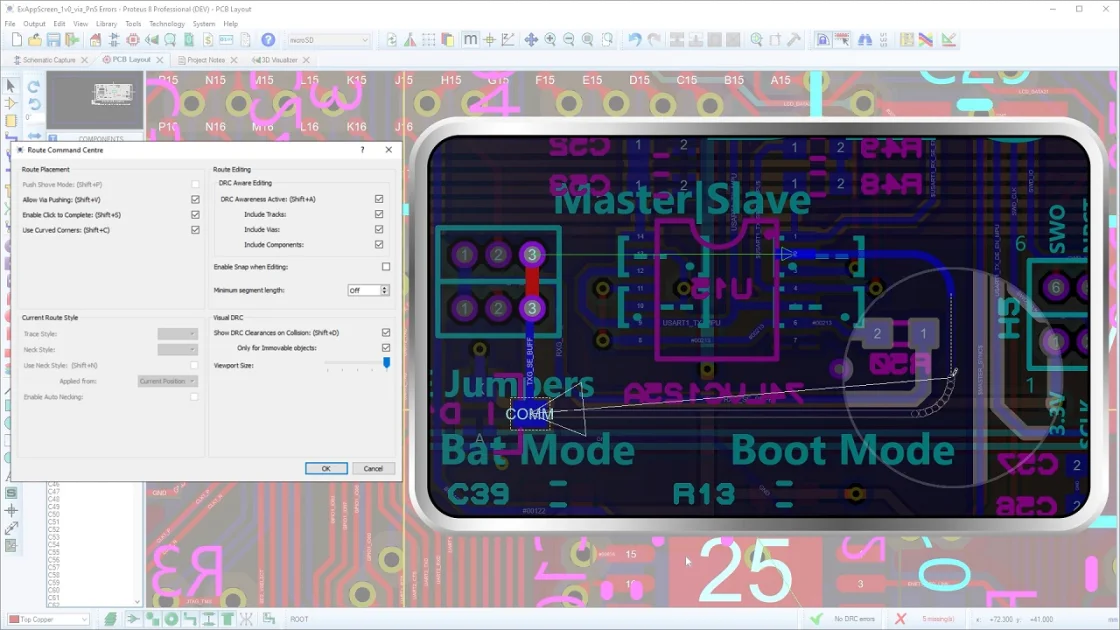
Route Command Centre
The Route Command Centre is now the hub to control the routing of a PCB on Proteus. Here you can select the tracking mode, editing restriction, visual display and track properties all from the press of a button.

Visual Design Rule Checking
Track routing in Proteus PCB now displays a circular overlay which shows the design rule clearances around objects already placed on the board. This provides a clear view of where best to route.

VSM for MicroPython
A quick project to show the end to end process for working with Micro Python and Proteus Design Suite. From creating a project to uploading the final code to the target device, this video will walk you through them all.