
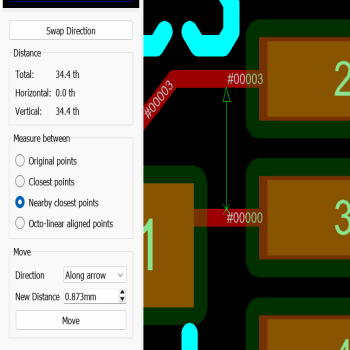
- Measure and Move for precision PCB layout.
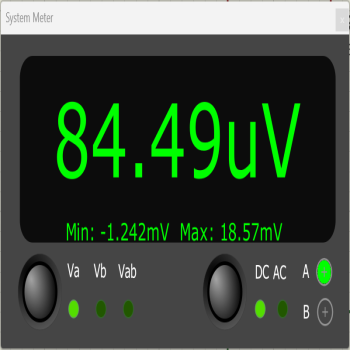
- Proteus System Multimeter.
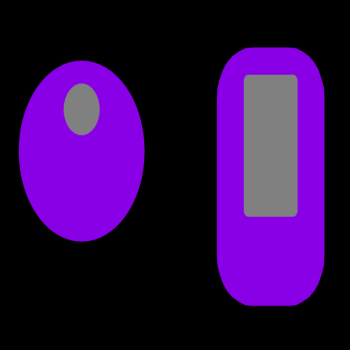
- Off Center holes in pads and Padstacks.
New Features
Proteus 9.2 introduces powerful new PCB design features including the Measure and Move tool, the Output Job Manager, full HDI Micro-Via support and Object Grouping. ProPilot gains AI-assisted library part creation, while VSM adds a new System Meter and expanded simulation support including BLE, RFID and STM32CubeIDE integration.
New features include:
- PCB Design:
- Measure and Move:
A new dedicated Measure Mode in the PCB layout allows direct measurement of the distance between any two objects on the board, with the cursor snapping to pad edges, trace edges, component courtyards, zones and 2D graphics. The Measure Panel displays live total, horizontal and vertical readings and offers selectable measurement modes including Closest Points, Nearby Closest Points and Octo-linear alignment, so the result reflects the true geometry rather than just the click positions. Once a measurement is established, the same panel can re-position an object to a precise new distance from its neighbour, removing the awkward workflow of setting a false origin or switching to a fine grid for tasks such as connector spacing, fiducial placement, heatsink clearance and rework access.
Measure & Move Movie - Output Job Manager:
The new Output Job Manager assembles all of a project's manufacturing and documentation outputs into a reusable profile that is executed as a single batch operation. Task types include Gerber, Pick and Place, Bill of Materials, 3D MCAD, Schematic PDF, Layout PDF, Bitmap, SVG and DXF, each with its full configuration retained inside the profile. Profiles are stored as portable .poprof files that can be shared between projects, workstations and colleagues, while field codes such as {{REV}} and {{BOARD}} automatically organise the resulting files by revision and board. Each run can include a pre-production check, automatic zone regeneration, an output log and a manifest file, giving a repeatable and traceable release procedure across the life of the project.
Output Job Manager Movie - Micro-Vias:
Proteus 9.2 introduces full HDI support with a 1+n+1 board style in the Stackup Wizard alongside refined internal- and external-layer pair constructions. The layer stack now formally distinguishes mechanically drilled spans from laser-drilled micro-via spans, with appropriate aspect ratio and minimum hole size constraints applied automatically. Micro-via spans integrate correctly with manual routing, smart vias, the via inspector, length matching and DRC, and are described in full in the CADCAM readme file and drill plot so that the fabricator has a complete and unambiguous description of the intended HDI construction.
Micro Vias Movie - Object Grouping:
Object groups provide persistent logical collections of objects on the PCB layout that move, rotate, mirror and copy as a single unit. Unlike a tag-box selection, a group is saved with the design and remains in effect until explicitly ungrouped, making it ideal for keeping a connector together with its mounting holes and keep-out graphics, or for binding a DRC room permanently to a component to enforce clearance and exclusion requirements from a datasheet. Groups may be nested to organise complex arrangements into logical tiers, and any block operation on a group member automatically expands to include the rest of the group and any nested sub-groups. - Miscellaneous:
DRC rooms have been enhanced with a via style override that lets the router substitute a nominated via style whenever a via is dropped inside the room and the layer transition is compatible. A new Exclude Foreign option turns a room into an exclusion zone, automatically voiding zone fills and flagging any foreign copper as a DRC violation; combined with object grouping, this gives a clean way to bind a part-specific keep-out to its component so that part and rule travel together on the layout.
Padstacks now support offset holes and slots, so the drill or slot can be displaced from the pad origin. This is important for connectors such as USB receptacles where the mounting pin hole is not centred within the copper land, and the offset is preserved correctly through Gerber X2 output and on import from other EDA tools.
The Pick and Place output has been extended with user-defined column ordering and full label editing, so the file produced can be matched directly to the requirements of a specific assembly machine or contract manufacturer without any post-processing. The pre-production checker results can now also be inserted as a formal data table inside the official Project Notes module, providing a clean, archivable record of design rule compliance for audit and review at each project milestone.
Miscellaneous Features Movie EDAi ProPilot: - AI Library Parts (Beta):
EDAi's ProPilot can now create complete library parts — a schematic symbol, a PCB footprint and the device definition that ties them together — from a natural-language description together with pasted-in datasheet pages. ProPilot first searches the existing DEVICE library for a suitable schematic symbol and the IPC-7351 footprint library for a matching package, falling back to constructing a custom symbol or footprint only when no library match is available. The generated part is presented in a modeless preview dialogue alongside the chat so that pin numbering, pin names and footprint dimensions can be reviewed and iteratively refined before clicking Import Part to commit it to the user library. The feature is provided as a beta release and is designed for an iterative workflow rather than a single-shot generation.
AI Assisted Library Parts Movie VSM Simulation: - System Meter:
The new System Meter is a virtual multimeter provided as a standard instrument during interactive simulation, complementing the System Oscilloscope introduced in Proteus 9. It uses live probes that can be placed or moved on any net in the schematic while the simulation is running, with two independent probes (A and B) and a differential Va-Vb mode for measuring the potential between any two points in the circuit. AC and DC coupling are both supported, and a Min/Max display captures the full range of a signal over time, which is particularly useful when adjusting interactive components such as potentiometers. When wire currents are enabled, the meter also reads current at any analogue net using the same live probe workflow, with animated wire arrows on the schematic showing the direction of flow.
System Multimeter Movie - VSM Simulation:
First-generation simulation models for Bluetooth Low Energy (BLE) and RFID are now included, enabling radio-protocol designs to be exercised end-to-end within the simulator without dedicated test hardware. The existing wired simulations have also been extended, with improvements to Ethernet and USB modelling for IoT and peripheral firmware development. The Cortex-M targets now expose a GDB Remote Serial Protocol server, which allows STM32CubeIDE — and any other GDB-compatible front end such as Keil Studio, VS Code with the cortex-debug extension, Eclipse CDT or CLion — to load firmware, set breakpoints and source-step against the live simulation exactly as it would against physical silicon.
STM32 Cube IDE Integration Movie For a full listing of features and fixes please log on to our support forums and look under the 'Updates and Fixes' section. Proteus 9.2 is available free of charge to all customers whose USC is valid as of 1st May 2026.